Design · UI/UX
Subtone
Smart Analytics
A private, mobile-first personal finance app that helps you decide whether you can afford something before you spend, not just record it afterwards.
- Platform
- Web app, installable to the home screen
- Built with
- React 19, TypeScript, Vite
- Role
- Design and development
- Year
- 2026
The app, screen by screen
Home
Home
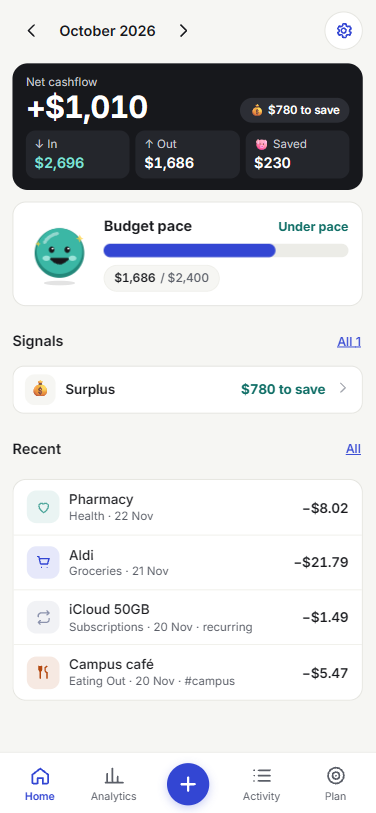
Net cashflow at a glance, a budget pace bar with Penny the mascot, one-row signals and the latest transactions.
Global
Add a transaction
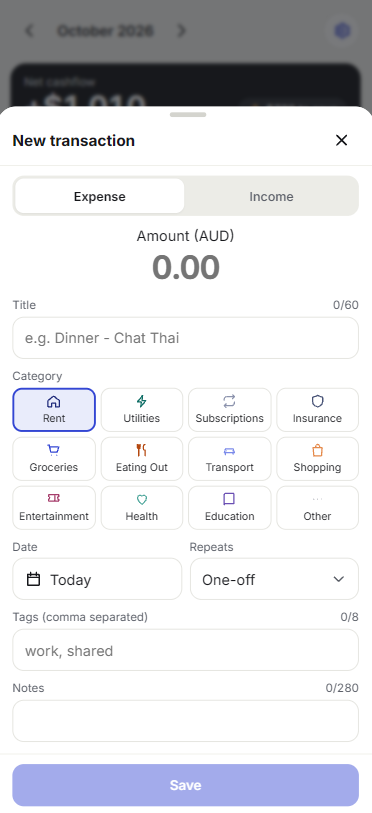
One bottom sheet from the + button: amount, title, a compact category grid, date, repeat, tags and notes, all on one screen.
Analytics
Breakdown
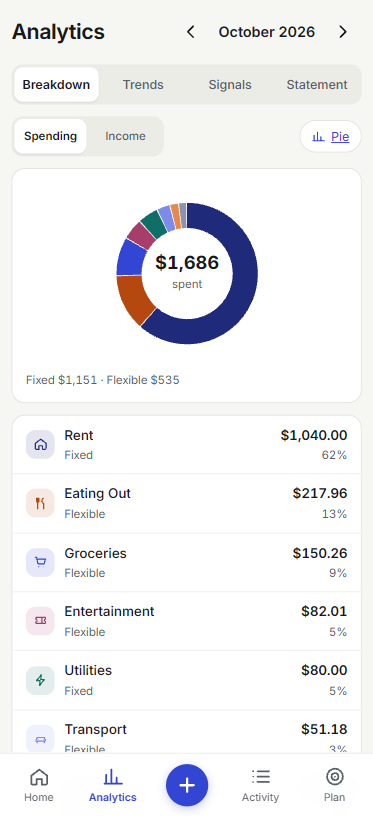
Spending or income by category for the month, split into fixed and flexible costs.
Analytics
Trends
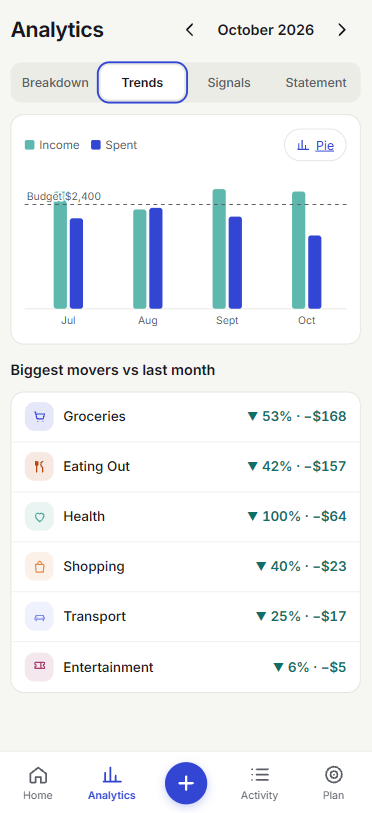
Six months of income against spending with the budget line, plus the categories that moved most since last month.
Analytics
Statement
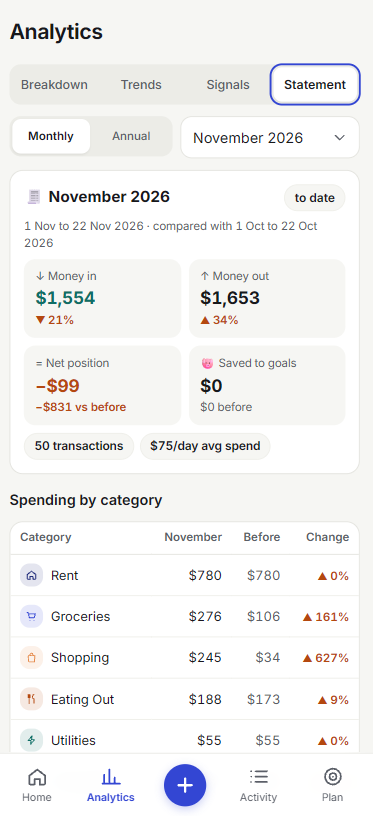
A bank-style monthly or annual statement, compared with the same span of the previous period and exportable to CSV.
Activity
Activity
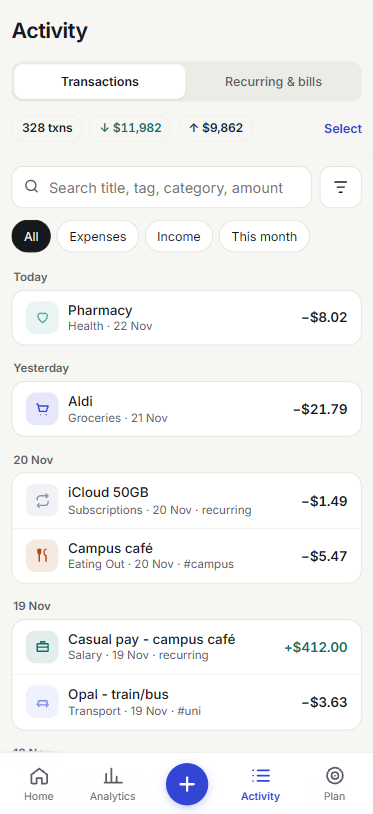
Every transaction with instant search and filters, plus bulk recategorise, tag and delete, all undoable.
Activity
Recurring & bills
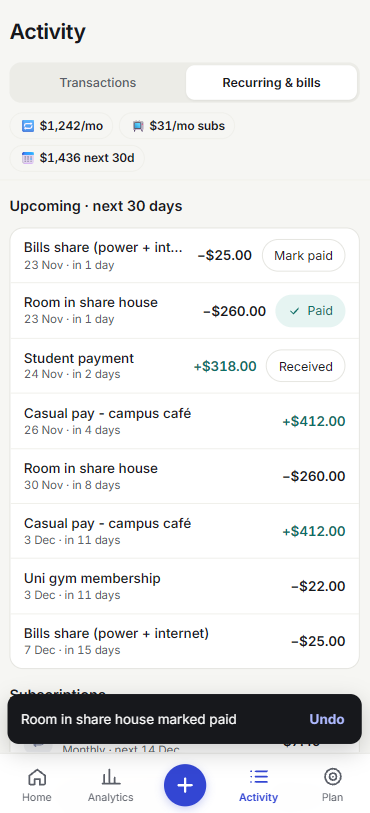
Weekly, fortnightly, monthly and yearly bills and income, the next 30 days at a glance, and Mark paid with Undo.
Plan
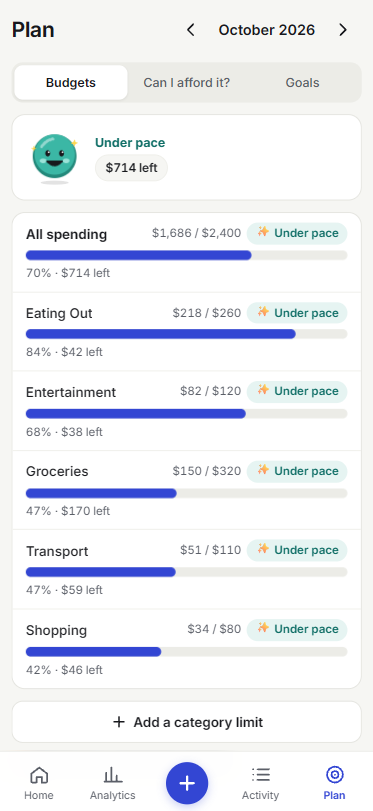
Budgets
An overall limit and per-category limits, each with a pace bar, a status badge and a projection.
Plan
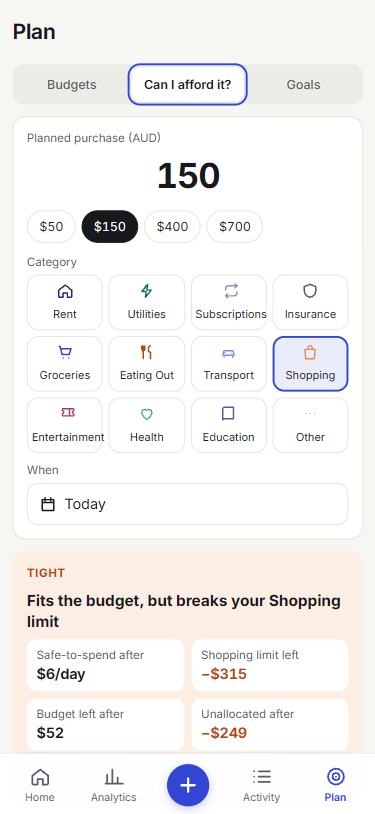
Can I afford it?
Enter any amount, category and date for a verdict, and see what's left to spend afterwards.
Plan
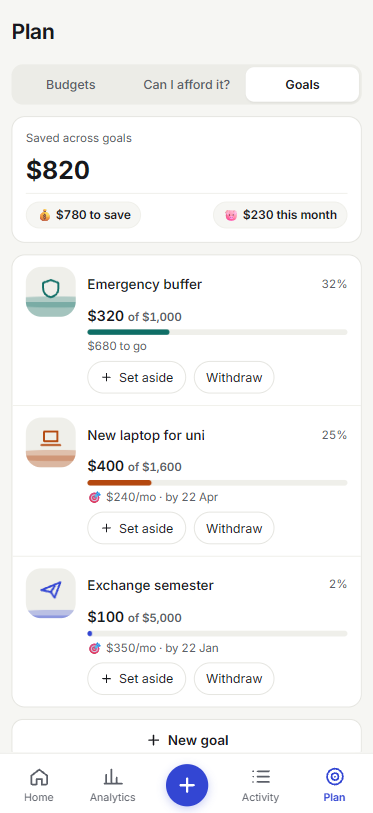
Goals
Savings jars that fill as you set money aside, with the monthly amount needed to hit a target date.
- 01Home
- 02Add a transaction
- 03Breakdown
- 04Trends
- 05Statement
- 06Activity
- 07Recurring & bills
- 08Budgets
- 09Can I afford it?
- 10Goals
The idea
Most budgeting apps tell you where your money went. Subtone looks ahead: it projects where the month is heading, sets aside the bills that are still to come, and turns that into plain signals and a daily safe-to-spend figure.
It's built for students and young professionals who budget on their phone and want a quick read of their money without linking a bank account. Everything stays on the device: no accounts, no trackers and no servers.
Why the web, not the App Store
I first intended Subtone to use Apple's native interface. But I wasn't going to release it on the App Store, so I built it with React instead. It runs in any browser and can be added to the home screen, where it opens full screen like a native app, works offline and has its own icon.
That choice also kept it private: with no backend, everything is stored in the browser on the device, and backups go only where the user saves them.
Installable
A web manifest, service worker and icon set give it Add to Home Screen on iPhone and Android.
Works offline
The app shell is cached, so it opens without a connection.
Private by design
No accounts or servers. Data stays in the browser, behind a storage layer that could switch to Firebase later.
How it was made
Subtone was shaped over five rounds of feedback. Each change was logged with before-and-after evidence, so every fix could be checked.
- Round 01
Frames before code
Eight phone screens were designed and approved before anything was built, and an evidence log was kept for every test and fix from the start.
- Round 02
The framework
Built the React, TypeScript and Vite app, made it installable, added the Inter typeface with aligned numbers, search, filters, recurring bills, savings jars and backups.
- Round 03
Less text, more feel
Home's text was cut by 43%, replaced by an animated pace bar and compact signal chips, with small animations that switch off when reduced motion is on.
- Round 04
Polish and fit
The add form was rebuilt to fit any phone, plus a bank-style statement, Penny the mascot, Undo instead of pop-ups, subtle sounds and layouts tested on seven device sizes.
- Round 05
Real-life data
Added a university student sample profile, with share-house rent, casual pay, a student payment and an exam-season spike, so the app could be tried with realistic numbers.
How it's built
The app is split into layers so the maths never touches the screen, the storage or the system clock. That keeps every number testable, and lets storage change without touching anything else.
01
Screens
React components and hooks. They show numbers; they never calculate them.
02
Store
One place every action goes through, saving only what changed and keeping Undo.
03
Analytics
Pure functions with an injected clock, so every figure on screen can be reproduced in a test.
04
Storage
One interface over the browser's storage. Swapping to Firebase needs only a new adapter.
- React 19
- TypeScript
- Vite
- Vitest
- Installable web app
- Hand-built SVG charts
- Web Audio
- Inter
The smart analytics
Every figure comes from simple, testable rules over the user's own data. Only flexible spending is projected forward.
Month-end projection
What's been spent, plus bills still due this month, plus flexible spending projected over the days left. Fixed costs like rent are counted once, never extrapolated.
Budget pace
Under pace, on pace, spending fast or over budget, decided by where the month-end projection lands against the limit.
Safe to spend per day
The limit, minus what's been spent and the bills still due, divided by the days left in the month.
Can I afford it?
Re-runs the projection with the purchase added: over budget, tight if it breaks a category limit, or comfortable.
Signals
Spending spikes against last month, unusually large transactions, bills due this week and surplus that hasn't been saved yet.
Design decisions
Money in whole cents
Every amount is stored in cents and every date as plain text, removing rounding drift and time zone errors.
No chart or UI library
Charts are hand-built in SVG and styles are plain CSS with design tokens, keeping the app small and fast.
Penny, the mascot
An original coin character with five moods, so budget pace reads at a glance instead of as a sentence.
Safe input
Length limits and character rules run as you type and again on every save, so imports and edited backups can't bypass them.
Testing
- unit tests passing
- 76
- device sizes checked, from iPhone SE to iPad Pro
- 7
- defects found and fixed in testing
- 16
- console errors
- 0
Some domain ideas were adapted from the open-source iOS app Inpenso (MIT licence) and re-implemented for the web, improving on its approach to money and dates along the way.
Explore the code
The repository is public, with the full source, tests and documentation.
MinSYou/Subtone on GitHub